
Science fiction and technology writer
 RSS Feed for this blog
Popular blog posts
Recent forum posts
Discussion Forum
Discussion forumShowing topics tagged as: Computer
My History of the Internet (Part 2) is on Ars Technica!
Post #: 312
Post type: Blog post
Date: 2025-06-10 16:07:22.000
Author: Jeremy Reimer
Tags: internet, computer history

The second part of my History of the Internet is up on Ars Technica! You can read it here:
https://arstechnica.com/gadgets/2025/06/a-history-of-the-internet-part-2-the-high-tech-gold-rush-begins/
It was super fun writing this article. As I was firing up emulators for old computer hardware and operating systems and installing old browsers, it felt like I was getting pulled back in time. Back to the exciting and tumultuous 1990s! Come and join me!
Views: 282
My History of the Internet (Part 1) is on Ars Technica!
Post #: 310
Post type: Blog post
Date: 2025-04-21 15:44:50.000
Author: Jeremy Reimer
Tags: internet, computer history
The first of my three-part article on the history of the Internet is up on Ars Technica!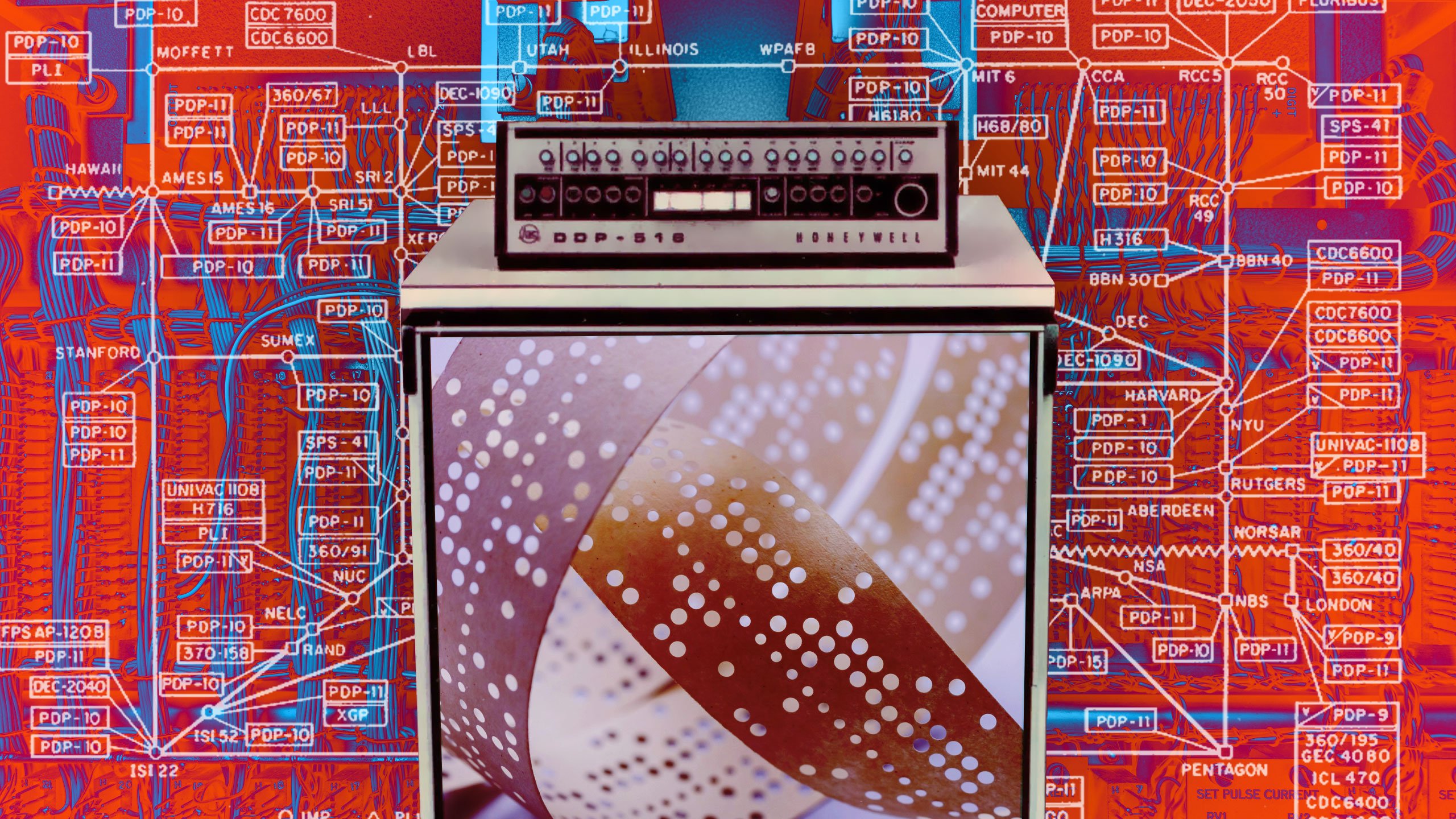
It's getting some great reviews, including a video review from Vint Cerf, the father of the Internet and co-creator of TCP/IP. Which is really cool. Check it out:
https://drive.google.com/file/d/19htTKvmifeHH3mTj6fw5rmWAhA19O-bJ/view
Part 2 is on its way!
Views: 451
A logo for micro-history.com
Post #: 289
Post type: Blog post
Date: 2022-04-20 20:16:36.000
Author: Jeremy Reimer
Tags: Computers Microhistory

This is a little something I whipped up on paper and then made real with a great little program called Affinity Designer.
I started with a stylized representation of an old 1970s all-in-one computer, something like a TRS-80 Model III, or my own Heathkit H-89.
Then I replaced the floppy disk drive on the right with a stylized book, to indicate the "history" portion of the site. Micro, History? Get it?
The orange color is just a color I liked and decided to theme the site around. No personal computers in the 1970s and 1980s were orange, but maybe that's the point. I tried the logo in more boring colors like grey and beige, but it just wasn't as cool.
And cool was what I was going for.
Views: 2644
The case for preserving microcomputer history
Post #: 288
Post type: Blog post
Date: 2022-03-31 15:15:42.000
Author: Jeremy Reimer
Tags: Computers Microhistory
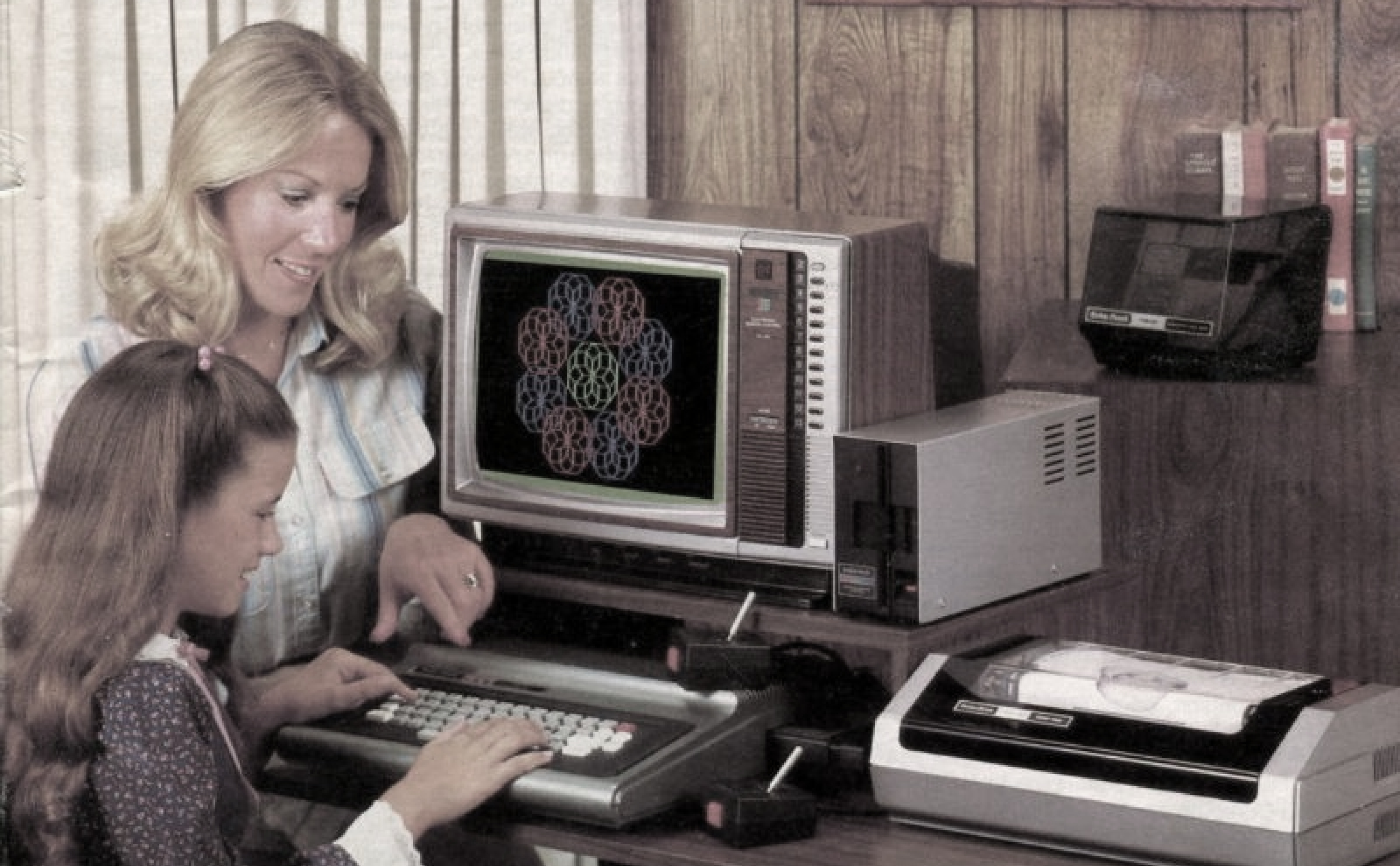
The term “Microcomputer” was born in the 1970s, along with computers it described. It distinguished these machines from “minicomputers”, which were the size of refrigerators, and “mainframes”, which were the size of rooms. Sometimes entire floors.
But while minicomputers were just smaller mainframes, microcomputers were a completely different thing. Banks and governments used mainframes, as they still do (in some cases) today. Minis were cheaper than mainframes, so they could be used by smaller organizations, like universities. Both types of computers were designed for, and sold to, institutions.
But microcomputers were for people.
The companies that made mainframes and minis couldn’t understand why any individual would want to own a computer. And the folks who made micros happen were people who would do anything to have their own personal computer. So when Steve Wozniak designed the Apple I at his desk at Hewlett-Packard on his own time, for fun, he was required by his contract to offer HP the chance to own it.
The HP manager declined, and the rest was history.
Today, we all carry, at all times, a nanocomputer, a super tiny and powerful computer in our pocket that is entirely ours, and is typically called a “smartphone”. Smartphones aren’t phones at all. They are smaller microcomputers, in exactly the same way that minis were smaller mainframes. They all connect to a massive global network of even more powerful microcomputers that all talk to each other constantly.
How did we get from there to here?
The story of the personal computer, the microcomputer, has been told at various times by various people. Some of these stories are in books that are now out of print and on television shows that can no longer be found on anything but faded, used VHS tapes.
And some of the folks who were around at the beginning of this revolution are starting to pass on. In just the last couple of years, we’ve lost Clive Sinclair, who gave the world the ZX81 and Spectrum, and John Roach, the driving force behind the TRS-80, among others.
There are many stories of this time that remain untold. There weren’t just a couple of microcomputer companies in the late 1970s. There were over fifty.. I know this because I counted them once, as a kid, looking at a single issue of Computers and Electronics. Even back then I knew this number was unsustainable. The industry exploded and companies rose and fell with frightening speed. Many fortunes were made and lost.
So who is going to tell all these stories?
I have my own experience in this space. Thanks to Ars Technica, I was able to complete my own dream of telling the complete History of the Amiga. This took me years, but it was some of the most exciting writing I’ve ever done.
Now, I want to do the same thing, but for all the other computers. I also want to do this on a new website that I’m building myself.
It’s a big project, and I’m going to need a lot of help. It also won’t happen right away. I’m going to take the time to prepare the groundwork first.
If you’d like to know more, and you’d like to sign up to be notified when the alpha of the site goes live, just head over to micro-history.com and sign up.
I’ll see you there!
Views: 2904
Breathing new life into an old computer for $50
Post #: 233
Post type: Blog post
Date: 2015-01-30 11:32:25.000
Author: Jeremy Reimer
Tags: Computers
I have a collection of old computers that seem to be approaching the end of their natural lives. The specs on one of them will seem familiar: a Core 2 Duo CPU, Windows XP, 2 GB of RAM, and a 19 inch 4:3 LCD monitor. Lots of people have computers like this. They are about eight to nine years old, and there is nothing particularly wrong with them, but these days they seem sluggish and ancient. They often get confined to closets or the recycling bin. However, there is a way to revive computers of this era, and it doesn’t cost that much. This is a story of how I gave my wife essentially a brand new computer for just over $50.
The first stop was Memory Express to pick up a brand new SSD. I asked the store clerk for a recommendation, and he told me about the Kingston SSD Now 300 series. The low-end, 120 GB version was just over $50, so I picked it up. It has good reviews and I like supporting a company that also supports professional Starcraft teams.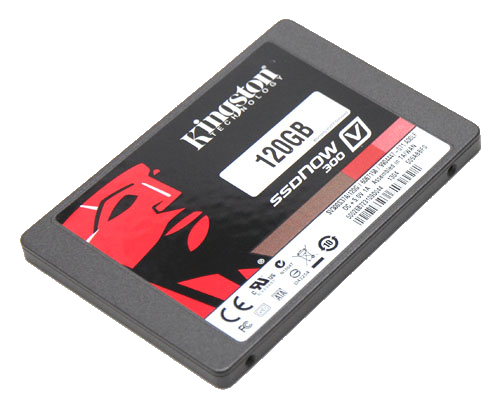
The next choice I had to make was what operating system to install. Windows 8 was right out, because my wife (like many people) has seen and dislikes the new user interface. Windows 7 might be a good choice, but getting a legal copy is expensive, and it’s an old and outdated operating system at this point. In the old days, Windows was a necessary choice because not many apps were web-based, and Linux distributions were still a bit finnicky to get going. Things are different now. But the most popular Linux distro, Ubuntu, has a very unusual user interface, so it wouldn’t be a good choice either.
I settled on Linux Mint 17, with the Xfce interface. It is the most lightweight clone of the standard Windows desktop, so it runs really well on older computers with limited amounts of RAM. It’s also familiar to anyone who has run Windows XP or 7. In fact, you can customize the bitmap image for the start button (and add the word "Start" to it). This makes it look a lot like good old XP, while simultaneously being a modern, secure operating system.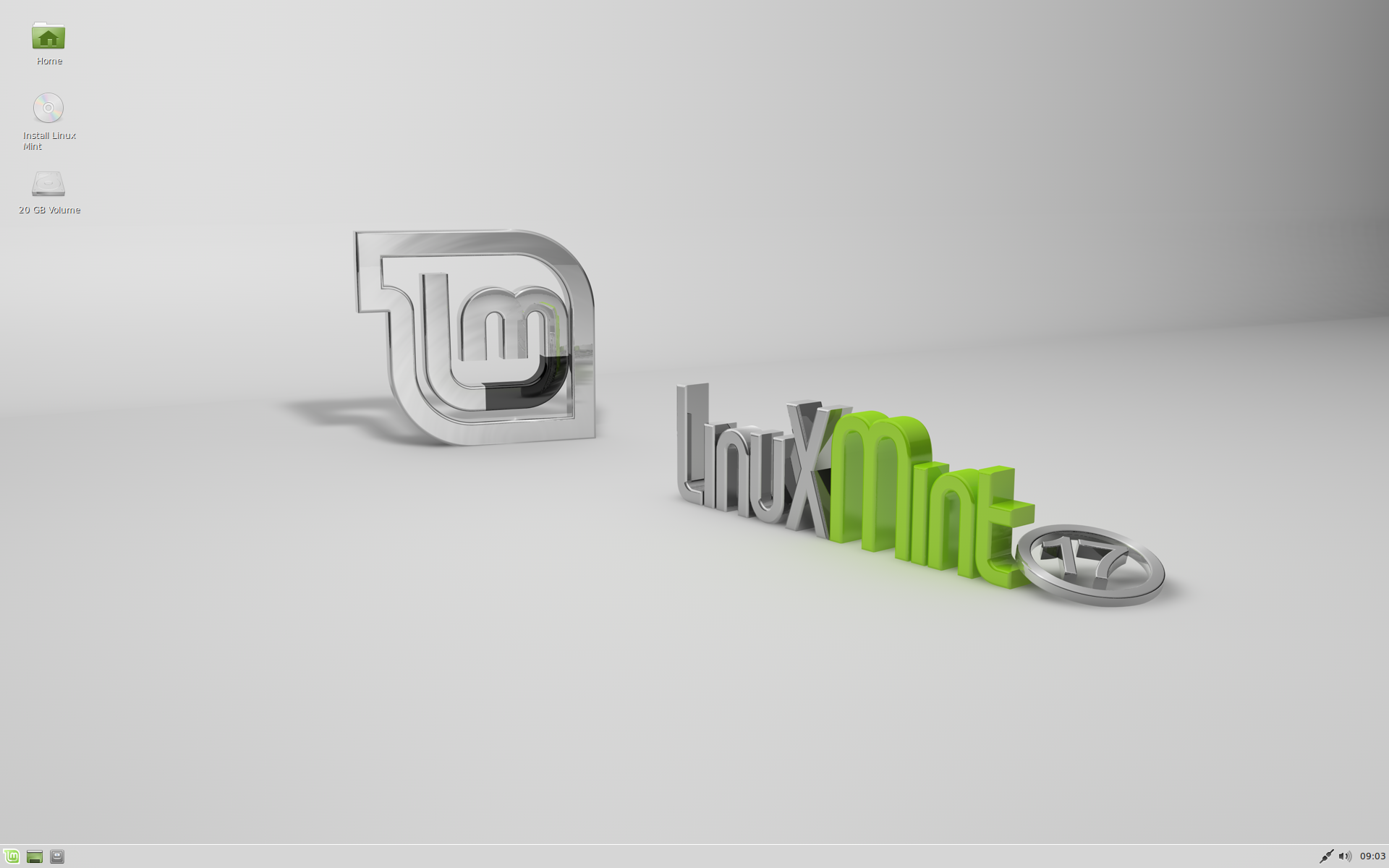
Linux Mint 17 comes pre-installed with Libre Office, which is a great clone of Microsoft Office and has an interface that is similar to Office’s standard menu and toolbar layout from 1995 through 2007. It also reads and writes Office documents seamlessly. Aside from using web applications, being able to write documents and spreadsheets was an important use case for my wife. She likes Libre Office better than the new Office "ribbon" interface that was introduced in 2007, and was using it on Windows XP before I upgraded, so this was a pretty seamless transition.
The only missing element for moving this computer to Linux would be gaming, but as my wife isn’t a gamer (apart from a few apps on her iPad) so that wasn’t an issue.
To install Linux Mint, I disconnected the existing two spinning hard drives and plugged the Kingston SSD into a single SATA port, then burned the .ISO to a DVD-R (I could have used a USB thumb drive, but it would have been a bit trickier, plus it’s been ages since I burned a DVD!) and booted from the shiny new disc. I let the installer format the entire SSD and install the operating system. Only once it was completely installed and running did I plug in the two drives again, setting them as secondary drives in the BIOS. Mint detected them instantly and I was able to copy over all the old documents on the drives to the new SSD. Having done this, I was able to disconnect the drives again to save power when running the computer.
It’s amazing how much faster this machine feels now. Launching LibreOffice takes less than half a second, compared to the half a minute it used to. It looks and feels like a brand new machine, and the price ($50 for the SSD and $0 for Linux Mint) couldn’t be beat.
Views: 9597
Half an Operating System - the triumph and tragedy of OS/2
Post #: 219
Post type: Blog post
Date: 2013-11-25 10:47:19.000
Author: Jeremy Reimer
Tags: Computers, Operating Systems
Writing is a funny thing.
As a young nerd, I was fascinated by personal computers and operating systems, and became a huge advocate of a funny operating system called OS/2. I spent a lot of time arguing about its merits on Usenet forums like comp.os.os2.advocacy. I moved on to Windows 95 when it was released, but always had a soft spot in my heart for IBM’s failed OS.
Twenty years later, I felt like the need to tell the story was welling up inside me until I was about to burst. I wrote the entire first draft in two days. Today, the article has been published on Ars Technica.
So did I take 20 years to write it, or two days? I guess it depends on your point of view. But I’m glad I wrote it.
Views: 8391
What was the deal with OS/2 anyway?
Post #: 193
Post type: Blog post
Date: 2013-06-27 20:56:27.000
Author: Jeremy Reimer
Tags: Computers, Operating Systems
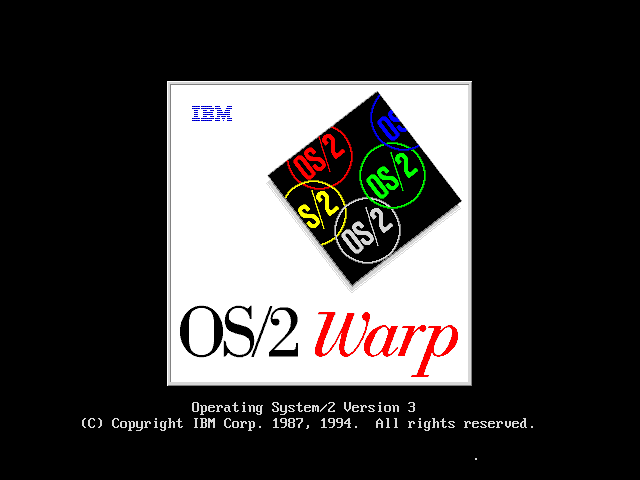
A lot of people today have some sort of vague idea about what OS/2 was, why it existed, and why it failed. Why did IBM fail to unseat Microsoft Windows? The reasons are many, but mostly it boils down to a very successful big computer company being afraid of disruptive change.
IBM hired Microsoft to write OS/2 because IBM wasn’t confident in writing PC software. But IBM still had control of the design of OS/2, even though Microsoft was writing the code. The 386 chip had been released in 1985, but IBM wanted to write OS/2 to support the older 286 chip instead, a chip that Bill Gates had called "brain-damaged". IBM didn’t want to code for the 386 because they were worried it was too powerful, and would cut into their profitable AS/400 minicomputer business.
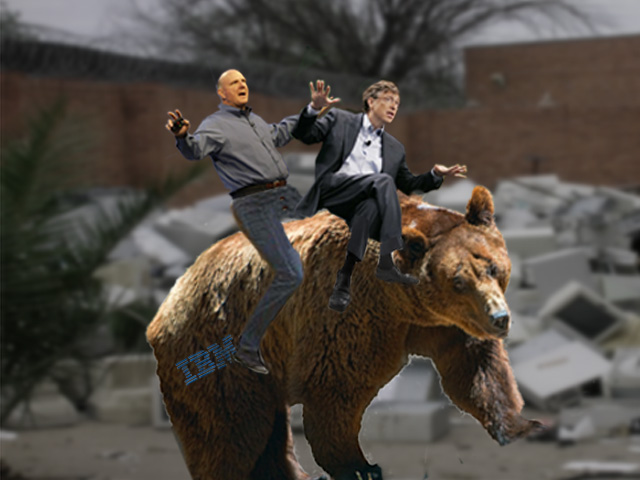
So if Gates didn’t like the 286, why did he let Microsoft go along with IBM’s plan? Because at the time IBM bestrode the PC industry like a Colossus. IBM was the "bear" and you were either riding the bear or you were under the bear, so Microsoft was going to ride the bear as long as they had to. If that meant dealing with IBM’s strange decisions, so be it. IBM made the rules for the PC industry, and Microsoft followed. Microsoft owed everything they had to the IBM PC and the clones that followed.
But Microsoft was smart enough to see that the winds were changing. IBM couldn’t hold back progress forever, and the decision to design OS/2 around the 286 meant that legacy DOS apps had to be run in the "penalty box", a compatibility box that could only run one app at a time and didn’t work with many apps anyway. (The 386, in contrast, had a ’virtual 8088’ mode that made multitasking many DOS apps fairly trivial).
So while Microsoft outwardly was promoting OS/2 as the next big thing, inwardly they kept dogging away at their Windows thing and they supported the 386 rather quickly (Windows/386 was in fact a special version of Windows 2.0 that multitasked DOS apps using the virtual 8088 mode, and all future versions of Windows would support this feature).
When Windows 3.0 was getting ready to be released, IBM offered to handle all the marketing and promotion, but in exchange IBM would own the code and the future of Windows. Microsoft wisely walked away from the deal. This was the beginning of the Microsoft-IBM divorce.
Windows 3.0 ended up being a smash success, and Microsoft realized that if they just kept telling other people that OS/2 was the future while they built their own Windows apps and stopped putting any real effort into OS/2, they could eventually own the world. Companies like Lotus that hated Microsoft with a passion just couldn’t wait to support OS/2 and ignore Windows. 1-2-3 for OS/2 (called 1-2-3/G) actually shipped before 1-2-3 for Windows. This gave Excel a chance to come in and just swoop up all the 1-2-3 for DOS users that were without a viable upgrade (1-2-3/G was not only late and missing features but performed extremely poorly) IBM eventually released a version of OS/2 that was coded for the 386 (although it still had 286 code in it for a long time) and tried to market it on their own with OS/2 Warp, but by that time IBM was no longer the standards setter in the PC business.
So what lessons can we learn here? IBM was afraid to push ahead its PC operating systems business because it might cut into sales of the more profitable minicomputer and mainframe lines. Microsoft, a more nimble and agile company, was able to ride this transition while preparing their own more powerful PC operating systems.
These days, Windows is the entrenched monopoly, and mobile devices are the disruptive force. The iPhone and iPad (and Android models) are rapidly becoming more powerful and finding their way into traditional personal computer use cases.
Windows, in this case, is the new AS/400, and the iPad is the new 386 PC. Microsoft doesn’t want to make the same mistake IBM did, so they are trying to make their own "386 PC" with Surface and unify their own "tablet experience" with the old school Windows. Thus you get the sort of odd hybrid that is Windows 8.
The market reaction to Windows 8 has not been positive, but Microsoft is used to playing the long game. Don’t count them out just yet.
Views: 7719
The History of the Amiga series returns!
Post #: 177
Post type: Blog post
Date: 2013-04-29 08:37:06.000
Author: Jeremy Reimer
Tags: Amiga, Computers
Part 8, or 8.5, or 9, depending on how you're counting, has been posted at Ars Technica!
http://arstechnica.com/gadgets/2013/04/a-history-of-the-amiga-part-9-the-demo-scene/
In this installment, I look at the demoscene, the amazingly creative group of people who made demos on the Amiga (and later the PC), held demoparties, and pushed forward the limits of graphics and the imagination.
Reaction to the article has been very positive:
"This article gave me chills. Excellent, excellent writing." - generic_1013
"Thanks author, I’m loving this series even though I just found out that it existed. Here’s hoping that it won’t take so long for the next installment." - secretknight42
"Awesome article and I got a mention in it too -- woot!" - MrNSX
I'm really excited and I'm going to start working on the next article right away!
Views: 7393
The Windows 8 Anchor
Post #: 170
Post type: Blog post
Date: 2013-04-11 18:51:41.000
Author: Jeremy Reimer
Tags: Computers, Operating Systems
The news is out that PC sales have fallen 14% last quarter over the same quarter a year ago.
Many people are blaming Windows 8 for accelerating this decline, rather than halting it.
Or, as The Professor so eloquently put it, "In other words, MS’s customers were drowning and Ballmer threw them an anchor."
The mental image made me laugh, so I thought I’d whip up something in Photoshop: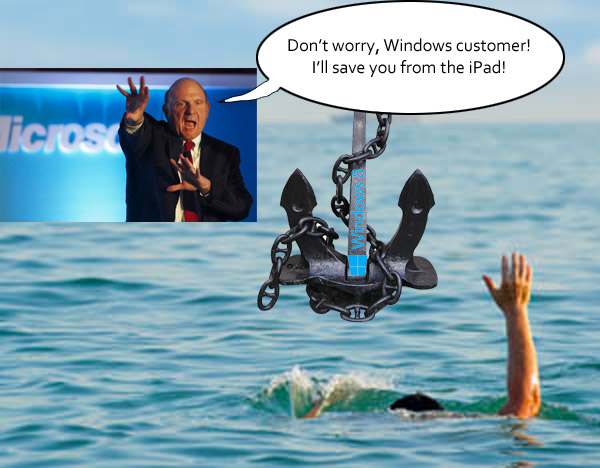
Views: 7139
Total Share: Personal Computer Market Share 1975-2010
Post #: 137
Post type: Blog post
Date: 2012-12-07 11:06:14.000
Author: Jeremy Reimer
Tags: Computers, Market Share
This is a recreation of the original article that was published at: http://jeremyreimer.com/postman/node/329
I have written two articles based on this data at Ars Technica:
Total Share: 30 years of personal computer market share figures - December 2005
From Altair to iPad: 35 years of personal computer market share - August 2012
(The second article also includes smartphone and tablet market share and compares them to the growth of the personal computer)
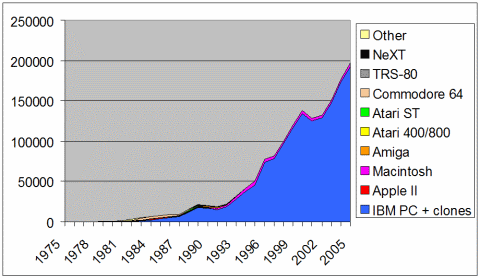
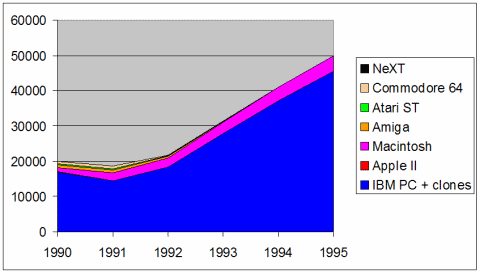
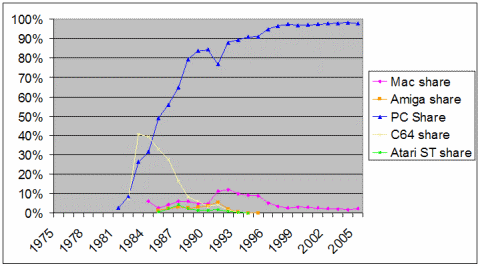
The first personal computer, the MITS Altair 8080, was released in 1975 and changed the world forever. A handful of geeks (Bill Gates included) saw this humble $395 kit as the beginning of something big... but nobody knew how big!
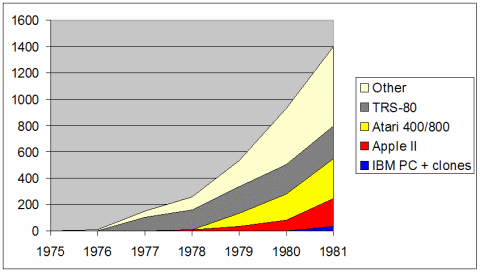
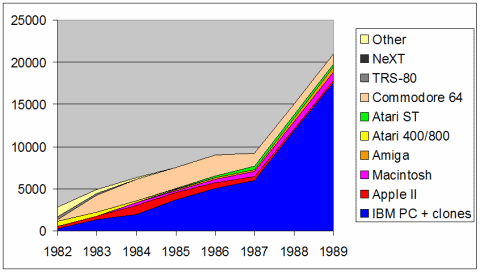
The Altair sold a few thousand units in 1975. Today, more than 300 million personal computers are sold each year! How did we get here, and which computer platforms were around for the journey? A lot of people who have come into personal computing recently do not know that there were once many different platforms-- a glance at a 1980 issue of Popular Computing revealed over 100 different manufacturers of incompatible brands!
The following graphs reveal some of the story, and show the incredible growth of the industry. They should also spark some memories of platforms gone by.
All figures in 1,000’s of units
Download the data in Excel format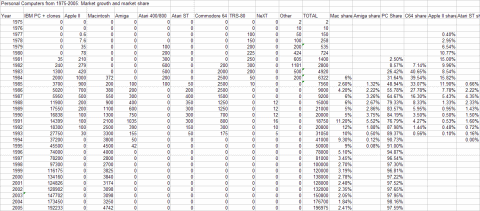
Notes on sources
Views: 98532
So who am I?
I'm a writer and programmer. I write science fiction stories and novels.
I am the writer for the upcoming documentary series Arcade Dreams.
I also write technology articles for Ars Technica.
I'm the creator of newLISP on Rockets, a web development framework and blog application.
- Email: jeremy.reimer@gmail.com
Topics
3D Modeling
About Me
Amiga
Articles
Audio
Blockchain
Blog
Blogs
Book Reviews
Book review
Comics
Computer history
Computers
Computers Microhistory
Computing
Conventions
Crypto
Daily update
Entrepreneur
Family
Forum post
Gaming
Gaming Starcraft
Gaming metaverse
Internet
Jeremy Birthday
Kickstarter
Knotty Geeks
Knotty Geeks (video)
Market Share
Masters Trilogy
Monarch
Movies
My Non-Fiction
My Science Fiction
NewLISP Blog
Novels
OSY
Operating Systems
Pets
Poll
Reviews
Science Fiction
Servers
Software
Software Operating Systems
Space
Star Gamer
Star Trek
Starcraft
Television
Testing
Toys Childhood
Wedding Marriage
Work
Work Life
World
Writing